User’s Guide
Mass management
Properties definition
The basic class to define an object with mass properties is mauspaf.MassElement3D (or just mauspaf.MassElement if you’re only interested in tracking the mass and cg. position in one dimension).
wing = MassElement3D(mass=200, x=3.2, y=0., z=2.2.,
                     ixx=2400., iyy=30., izz=2400)
airframe = MassElement3D(mass=300, x=3.5, y=0., z=2.,
                         ixx=1200., iyy=1200., izz=1200)
To calculate the mass properties of a group of several masses, the objects can be simply added with +.
empty_airplane = wing + airframe
empty_airplane.describe()
> Mass objects with the following properties:
>    Mass: 500
>    X-Coordinate c.g.: 3.38
>    Y-Coordinate c.g.: 0.0
>    Z-Coordinate c.g.: 2.08
>    Moment of inertia X: 3610.8
>    Moment of inertia Y: 1245.6
>    Moment of inertia Z: 3610.8
>    Product of inertia XY: 0.0
>    Product of inertia YZ: 0.0
>    Product of inertia ZX: 7.200000000000001
The class mauspaf.MassObject3D allows to assign different mass values depending on the calculation method used to get the mass. The three methods are the following:
Estimated: Calculated without knowing the properties of its subparts.
Calculated: Calculated adding the properties of its subparts.
Measured: Measured mass properties.
Typically, during the initial design stages only the estimated mass properties of an object will be known. As the project develops and a breakdown structure is created, the mass properties of top-level parts can be calculated adding the properties of its subparts (calculated properties). Finally, once a part is built, the properties can be measured.
aircraft_estimated_properties = MassElement3D(mass=550, x=3.7, y=0., z=2.,
                                              ixx=35e2, iyy=1200., izz=3600)
aircraft = MassObject3D(estimated=aircraft_estimated_properties,
                        calculated=(wing+airframe),
                        measured=None)
Since this three sets of mass properties for the same object can coexist in time, an active set of properties needs to be defined.
print(aircraft.active_properties().mass)
> 550.
Once a certain maturity is reached, the active set can be changed.
aircraft.active = 'calculated'
print(aircraft.active_properties().mass)
> 500.
Mass trees
The relationship between several masses can be defined using a tree. This is done defining a dictionary with the parent part of each structure. The following code shows the creation of a MassObjectTree to calculate the mass propertie of an aircraft cabin, consisting of two seats and furniture. The two seats are further grouped into the MassObject3D seats.
seat1 = MassObject3D(estimated=MassElement3D(mass=10),
                     measured=MassElement3D(mass=20),
                     id='s01')
seat2 = MassObject3D(estimated=MassElement3D(mass=10), id='s02')
seats = MassObject3D(active='calculated', id='s00')
furniture = MassObject3D(estimated=MassElement3D(mass=10))
cabin = MassObject3D(active='calculated')
cabin_tree = MassObjectTree(
    elements_list=[seat1, seat2, seats, furniture, cabin],
    parent_dict={'s01': 's00', 's02': 's00', 's00': cabin.id,
                 furniture.id: cabin.id})
print(cabin_tree.active_properties().mass)
> 30.
Once a value in the tree is changed, the values can be recomputed:
seat1.active = 'measured'
cabin_tree.update()
print(cabin_tree.active_properties().mass)
> 40.
Uncertainties
Instead of using constant values, probability distributions as well as bounds can be assigned to each variable using the module uncertain (created by the same author as MauSPAF).
Plotting
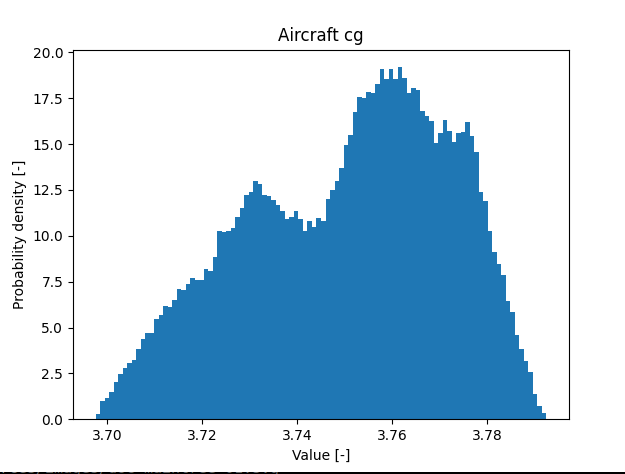
Probability distribution plots.
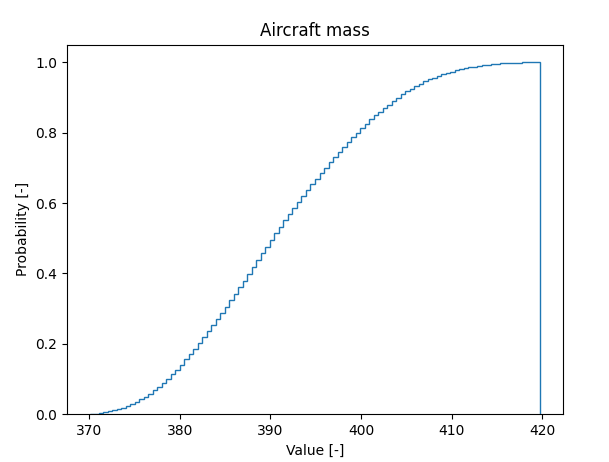
Cumulative distribution plots.
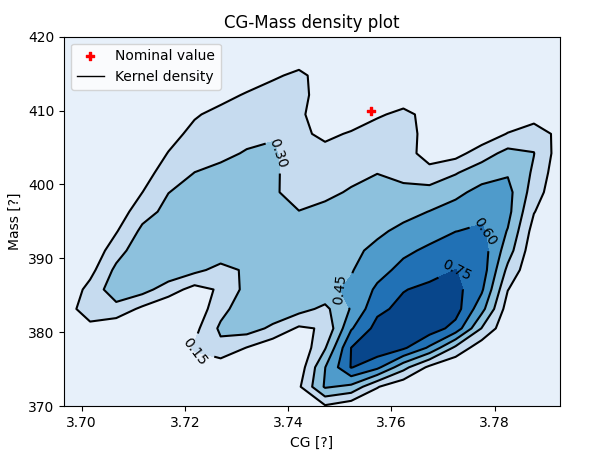
Kernel density for mass and cg. position.
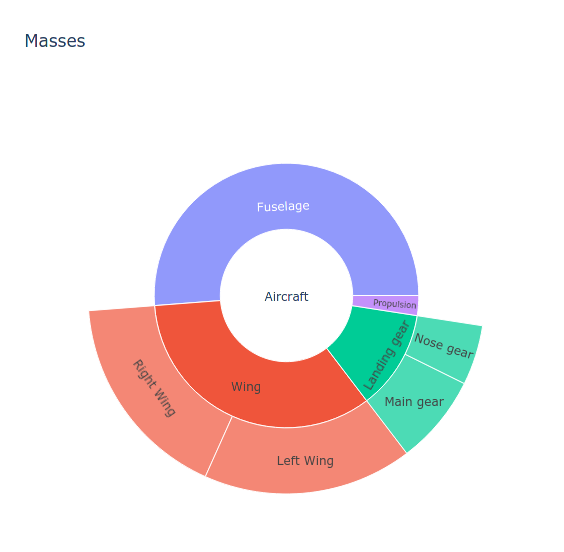
Interactive sunburst plots.
Rotation
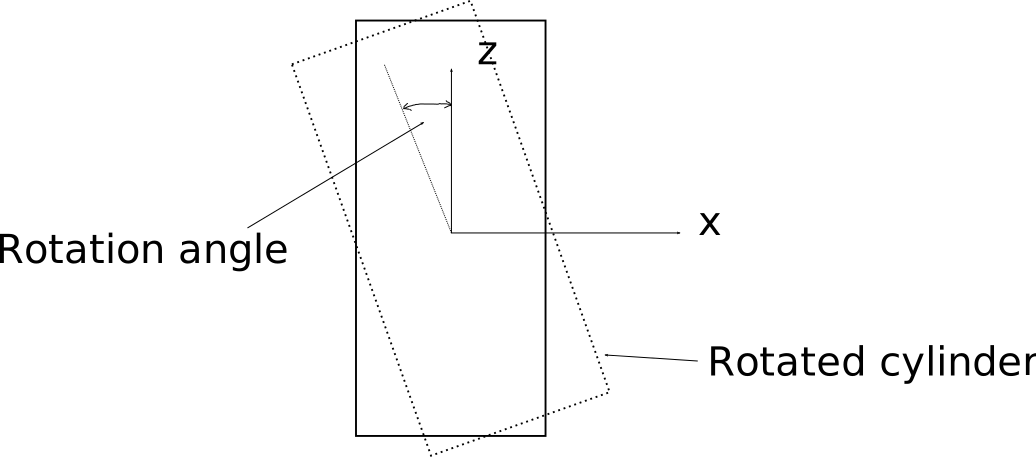
mauspaf.MassElement3D objects can be rotated around any axis in a 3D space. The following code snippet shows the calculated moment of inertia around the y-axis (Iyy) of a hollow cylinder tilted by 5±0.5 degrees around the x axis.
# Import needed libraries
import numpy as np
import mauspaf
import uncertain

# Rotation angle definition
rotation_angle = uncertain.UncertainValue(
    5,        # Nominal value
    3,        # Lower boundary
    7,        # Upper boundary
    'normal', # Distribution type
    [5, 0.5])  # Distribution parameters

# Calculate properties of the hollow cylinder
cylinder_properties = mauspaf.masslibrary.solids.hollow_cylinder(
    le=2,       # Length
    ro=10,      # Outer radius
    t=1,        # Wall thickness
    rho=0.0977, # Density
    units={'ro': 'cm', 't': 'mm', 'rho': 'lb/in3'})

# Create a mass object with the properties of the hollow cylinder
hollow_cylinder = mauspaf.core.mauspaf.MassElement3D(
    mass=cylinder_properties['m'],
    ixx=cylinder_properties['ix'],
    iyy=cylinder_properties['iy'],
    izz=cylinder_properties['iz'])

# Rotate the hollow cylinder
hollow_cylinder.rotate(
axis=[1, 0, 0],
angle=rotation_angle*np.pi/180)

# Plot distribution
hollow_cylinder.{i}.plot_distribution(title="{i}")'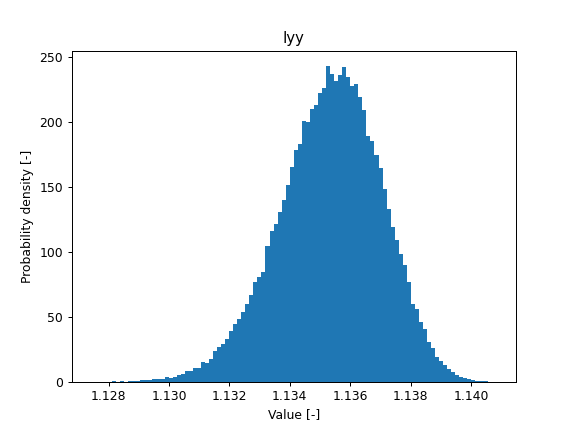
Mass library
In mauspaf.masslibrary a series of formulas are provided to calculate mass propertie of different objects. This includes geometrical objects (mauspaf.masslibrary.solids, mauspaf.masslibrary.shells, mauspaf.masslibrary.thinrods) as well as class II estimation formulae for aircraft (mauspaf.masslibrary.aircraft). The result of the calculation is always a dictionary containing all the properties.
import mauspaf.masslibrary.solids as sl
cube_properties = sl.cube(a=1, rho=2700)['m']
print(cube_properties)
> {'a': 1.0, 's': 6.00000000000000, 'rho': 2700.0, 'm': 2700.00000000000, 'ix': 450.000000000000, 'iy': 450.000000000000, 'iz': 450.000000000000, 'v': 1.00000000000000}
If you’re only interested in one property, get the relevant value from the dictionary.
cube_mass = sl.cube(a=1, rho=2700)['m']
print(cube_mass)
> 2700.
You can use any set of input variables to calculate the properties of the object.
cube_mass_1 = sl.cube(a=1, rho=2700)['m']
cube_mass_2 = sl.cube(v=1, ix=450)['m']
print(cube_mass_1 == cube_mass_2)
> True
The value of the properties can be provided in any unit supported by the module unitc <https://mnn.gitlab.io/unitc>. The units can be defined either passing the value of the property as a string or using the dictionary units. The units provided in this variable apply for the calculated values as well.
print(sl.cube(a='1 m', rho='1000 kg/m³')['m'])
print(sl.cube(a=1e3, rho=1e3, units={'a': 'mm', 'rho':'kg/m³', 'm': 'g'})['m'])
> 1000.
> 1.e6
GUI
The GUI currently provides two functionalities:
Simple mass tree calculation with uncertainties (mass and 1D cg. properties) and simple plotting.
Convenient interface to use functions in the mass library.
Simple mass tree
Main interface:
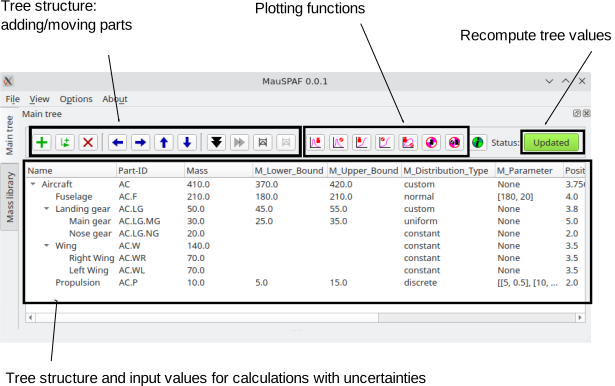
Some of the plots created using the GUI (from left to right - probability distribution, cumulative probability distribution, kernel plot with mass and cg. location, sunburst plot):

Mass library
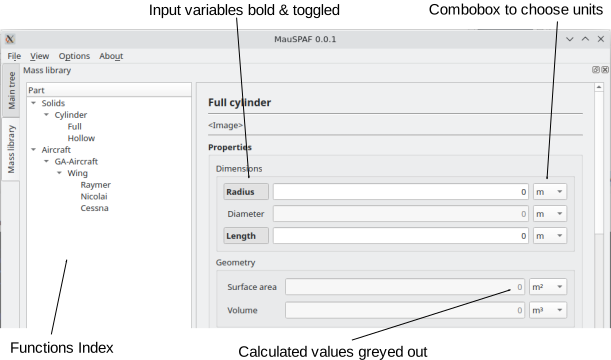
For every element in the mass library, the following aspects are found in the GUI:
Name, value and unit of every object property involved in the calculation. Clicking on the name of the property, the property can be toggled to be an input or output for the calculation.
Equations used to calculate the properties.
Description of the variables used to calculate the properties. If not specified, SI units are assumed.
Source of the equations used. For class II formulas, assumptions to apply the equations are listed as well.
Simple sketch of the geometric objects.